Secret Lairs Presentation

Showing posts with label Digital Set. Show all posts
Showing posts with label Digital Set. Show all posts
Friday, 13 December 2013

Thursday, 12 December 2013
Secret Lairs: Digital Set - Texture Process
Adding Textures
Here are screen shots of me adding textures to my models so far.


Secret Lairs: Digital Set - Grass Alpha Map
Dark Grass/Foliage
Here is my dark grass applied to my Maya scene.


^ .jpeg image of grass texture.
Secret Lairs: Digital Set - Prop Light Comparison
Beginning Lighting Test(s)
Renders of lighting tests to see whether the Hero Prop should glow or not.

^Colour Light

^White Light
Secret Lairs: Digital Set - More Alpha Maps
Adding Lighter Leaves
Here is the second Alpha Map of lighter White/Grey reflective textures.


Photoshop Image (As .jpeg)

I created this using a simple texture of a brush over layering a couple of times.
I then used the lasso tool to get larger, leaf-like shapes.
Wednesday, 11 December 2013
Secret Lairs: Digital Set - Hero Prop Modelling
Hero Prop Modelling
Here are screenshots of figuring out how to model my hero prop in Maya.


Restart<<<

At first I created a mesh to for the outline of my model, however this create many poly's that would increase rendering time. Therefore, I started again and created a more simple model to work from.
Tuesday, 10 December 2013
Secret Lairs: Digital Set - Adding Features
Developing Scene Elements
Here is the beginning of creating extra items within my scene and adding more dark leafy alpha maps.


MAYA CRASH!
Maya suddenly crashed when creating other items within my scene. This has reminded me about saving!


Adding the tree roots to begin the pathway.
Monday, 9 December 2013
Secret Lairs: Digital Set - Simple Paint Overs
Simple Paint Overs
Here are 2 paint overs of my Maya scene. I would be very grateful for any feedback regarding these designs or any other constructive suggestions you may have.

My favourite of the two is number 1. I feel it draws your eye into the scene, despite the lack of detail in comparison to number 2.

^ description of my Maya scenes and further ideas.
Secret Lairs: Digital Set - New Layout & Alpha Map
Creating Leaf Alpha Map & Layout
Beginning this afternoons Photoshop lesson, it was a group discussion that the 'chamber' object was creating an unusual sense of misplacement. Therefore, I have removed this and moved the stairs over towards the hero prop.


Jordan showed my how to create an Alpha Map to help give my lair a bit more style. The texture on these leaves is my secret lair concept art. I then placed this in Maya to form leaf structures to begin adding a much more stylised environment.
Monday, 2 December 2013
Secret Lairs: Digital Set - Blocking Out & Camera
Lighting - Camera View
This is my lighting incorporated into my scene - adjusting its intensities.


Above, the general Maya view settings.
Secret Lairs: Digital Set - Blocking Out & Lighting
Block Out and Simple Lighting Model
720p
720p
During this afternoons Photoshop/Maya lesson, Jordan showed me with the idea of blocking out my scene before I start refining detail in things within Maya and textures. The shrubbery was created use the Maya brushes. I realized that I needed to create a ''scene'' instead of the basic floating objects. This aloud me to get form present within the camera set up.

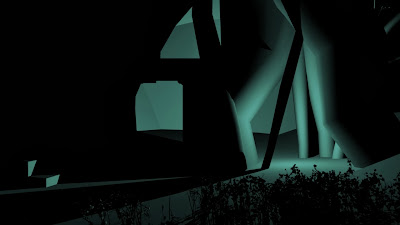


Above, basic lighting tests and adjustments.


At first I grounded my model, so nothing was higher than it should be. After which we decided that the composition needed wok, therefore adding bulky shapes to suggest forms. The scene itself in a natural environment, therefore I needed to have a natural, 'non-smooth' surface(s).
Subscribe to:
Posts (Atom)